avonil.net Logo
Main Page
Internet & Local Links
Homepages
Classifieds
Change your Account
User Support
System Status
Business Guide

Publishing Web Pages using FrontPage 2000™

NOTE: This page is only meant to assist avonil.net dialup customers publish Web page using FrontPage 2000. It does not provide instructions on creating Web pages with Front Page 2000.

1) Start FrontPage 2000

2) Design your Web page

NOTE: FrontPage extensions are not supported for dialup account Web space

3) Save your Web page to your local computer using File --> Save

NOTE: If your main page has the file name "index.html" or "index.htm", then your web page will will be displayed at the address:
                   http://homepage.avonil.net/~USERNAME

where USERNAME is your own username,
and will appear on the list of avonil.net web pages at:
                   http://homepage.avonil.net/homepage/homepages.pl

If your page has any other name, then your page's address will be:
                    http://homepage.avonil.net/~USERNAME/PAGENAME
and will NOT appear in the list of avonil.net web page.
(USERNAME is your own username and PAGENAME is the filename you assigned to your page.)

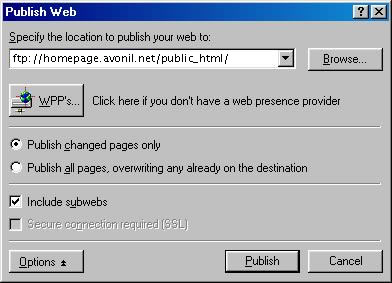
4) Upload your web space to the server by clicking on File --> Publish Web

5) You will be prompted to specify the location to publish: enter

ftp://homepage.avonil.net/public_html/

6) Click on the Publish button when other options are to your liking

7) You will be prompted for a name and password. Enter them and click ok.

    Name: [Enter your username]
    Password: [Enter your password]


avonil.net
Infobahn Outfitters, Inc.
PO Box 248, 716 E. Jackson, Macomb, IL 61455
(309) 836-3706     (800) 839-3706
help@avonil.net
© Copyright 1997-2005, Infobahn Outfitters, Inc.